
SQL Unit Testing Using tSQLt: Part 4
We’re back once again, with another instalment of the tSQLt series. I hope you’ve been enjoying it so far. Personally, I’ve had a blast getting back into this topic. In the last post, we covered one of the many useful features of tSQLt, the Fake Function option.
Taking this further, in today’s post, I want to cover the Spy Procedure option.
The Setup - Our Stored Procedure
Once again, to demonstrate today’s topic, we will complete a small demo. We’re going to use the same procedure from the last post and build upon it slightly. As before, we will be using the StackOverflow2010 database.
Here is the full stored procedure that we will be testing:
CREATE OR ALTER PROCEDURE [dbo].[GetUserDetail_LastYear]
	@DisplayName NVARCHAR(100)
AS
BEGIN

    DECLARE @Now            DATETIME
    DECLARE @OneYearAgo     DATETIME

    SET @Now                = dbo.DateTimeNow()
    SET @OneYearAgo         = DATEADD(YEAR, -1, @Now)

    SELECT
        u.DisplayName,
        u.Location,
        u.Reputation,
        COUNT(c.Id) AS CommentCount
    FROM dbo.Users u
    INNER JOIN dbo.Comments c ON u.Id = c.UserId
    WHERE
        u.DisplayName = @DisplayName
        AND c.CreationDate BETWEEN @OneYearAgo AND @Now
    GROUP BY u.DisplayName, u.Location, u.Reputation


    /* Capture Execution Data */
    DECLARE
        @Proc   NVARCHAR(100)   = OBJECT_NAME(@@PROCID),
        @Who    NVARCHAR(300)   = SUSER_NAME(),
        @When   DATETIME        = GETDATE()

    EXEC dbo.AddToAuditLog @Proc,@Who,@When

END
The only addition made to the procedure, since our last post, is the addition of a call to another stored procedure, dbo.AddToAuditLog. This procedure simply captures some metadata about the procedure’s execution, such as the procedure name, user, and time.
When we execute our procedure like this:
EXEC dbo.GetUserDetail_LastYear @DisplayName = 'Jon Skeet'
We get the following results:

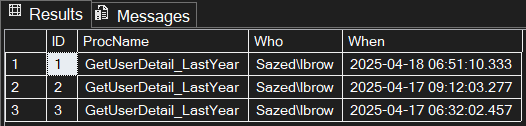
However, this time, we are also logging information into an ‘audit’ table, via our use of our embedded procedure - dbo.AddToAuditLog:
The Setup - Our Unit Test
Our unit test currently is identical to how we finished up on the last post. The latest addition to it was the introduction of the Fake Function option. Here is the full procedure as it currently stands:
CREATE OR ALTER PROCEDURE [tests].[test GetUserDetail_LastYear]
AS
BEGIN

DECLARE
	@UserName NVARCHAR(100)	= 'Jon Skeet'


/* ASSEMBLE STAGE */

EXEC tSQLt.FakeFunction @FunctionName = 'dbo.DateTimeNow', @FakeFunctionName = 'Fake.DateTimeNow'


EXEC tSQLt.FakeTable 'dbo.Users'

INSERT INTO dbo.Users
(Id,DisplayName, Location, Reputation)
VALUES
	(22656,	'Jon Skeet'	    ,'Reading, United Kingdom'	    ,1047863),
	(22661,	'Virne'		    ,'Finland'			            ,1076),
	(22668,	'Dickon Reed'	,'Cambridge, United Kingdom'	,2237)


EXEC tSQLt.FakeTable 'dbo.Comments'

INSERT INTO dbo.Comments
(Id, UserId,CreationDate)
VALUES
	(436275	, 22661 , '2020-05-01 09:39:00.000'),
	(197827	, 22668 , '2024-09-26 16:35:51.177'),
	(37360	, 22656	, '2024-09-26 16:35:51.177'),
	(37585	, 22656	, '2025-01-26 16:35:17.310'),
	(36000	, 22656	, '2022-08-26 19:21:42.357')


CREATE TABLE dbo.Expected
(DisplayName NVARCHAR(100), Location NVARCHAR(200),Reputation INT, CommentCount INT)


CREATE TABLE dbo.Actual
(DisplayName NVARCHAR(100), Location NVARCHAR(200),Reputation INT, CommentCount INT)


INSERT INTO dbo.Expected
(DisplayName,Location, Reputation, CommentCount)
VALUES
	('Jon Skeet',	'Reading, United Kingdom',	1047863,	2)


/* ACT STAGE */

INSERT INTO dbo.Actual

EXEC [dbo].[GetUserDetail_LastYear]
	@DisplayName	= 'Jon Skeet'


/* ASSERT STAGE */

EXEC tSQLt.AssertEqualsTable
	@Expected	= 'dbo.Expected',
	@Actual		= 'dbo.Actual',
	@FailMsg	= 'Our test failed!'

END
The importance of Unit Test isolation
So we have our updated procedure, which now contains that additional call to the procedure dbo.AddToAuditLog. We also have our unit test to test the main procedure dbo.GetUserDetail_LastYear. Everyone keeping up? Goodo.
Currently, everything runs well, and we are validating the functionality of our main stored procedure, each time we run our unit test. Great. However, there is still a potential issue and I’ll show you why.
Let’s say that one day, somebody introduces a bug into our embedded procedure dbo.AddToAuditLog. (Zero changes are made to our main procedure)
Let us simulate that ‘bug’ now within our embedded procedure. As shown below, we will simply add a RAISERROR to the procedure, dbo.AddToAuditLog:
CREATE OR ALTER PROCEDURE [dbo].[AddToAuditLog]
	@ProcName		NVARCHAR(100),
	@Who			NVARCHAR(300),
	@When			DATETIME
AS
BEGIN

	INSERT INTO dbo.AuditLog (ProcName,Who,[When])
	VALUES (@ProcName,@Who,@When)

	-- Our Fake Bug Here
	RAISERROR('Fake Bug', 16, 1)
END
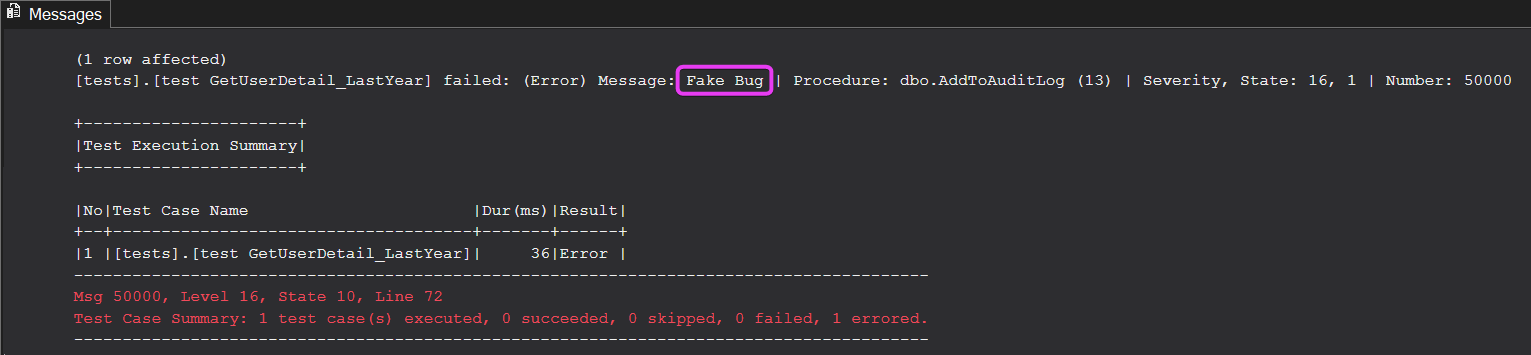
The next time we run our unsuspecting unit test, [tests].[test GetUserDetail_LastYear], we will see this:
Bug’s Life
Our unit test has failed, and the culprit is our ‘fake bug’ within the embedded stored procedure. Despite no changes being made to our main stored procedure or unit test, the test is now failing. Naturally, this is far from ideal. Consider a scenario where our main stored procedure interacts with numerous other stored procedures. With different development teams making frequent changes to these external dependencies, our unit test could break at any moment — despite the fact that the underlying procedure itself remains unchanged.
The Spy Procedure
As we have shown, having unhandled dependencies to other objects is risky. Even though our main stored procedure and unit test remained the same, the unit test is now failing due to an ’external’ dependency on another stored procedure.
Thankfully the folks at tSQLt have a way to handle this. Enter the Spy Procedure.
The Spy Procedure enables the creation of tests for a procedure while keeping it independent from the procedures it invokes.
From tSQLt.org
To create independent tests, we can replace the functionality of a stored procedure with a spy. The spy will record the parameters that were passed to it.
At its very basic functionality, Spy Procedure allows us to simply ‘ignore’ a particular procedure call, and that’s how we’re going to utilise it today.
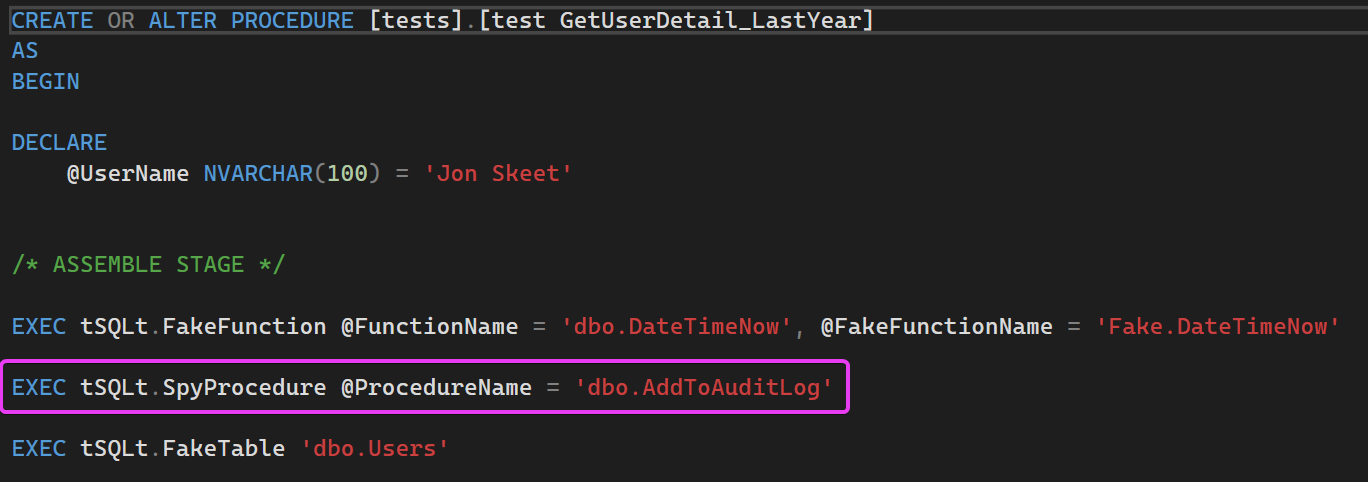
So, we’re going to add the following line of code:
EXEC tSQLt.SpyProcedure @ProcedureName = 'dbo.AddToAuditLog'
This tells tSQLt to simply ignore any references (or calls), to our audit log procedure. As you can see below, we have added the Spy Procedure call within our Assemble stage:
The next time we execute our Unit Test, everything, once again, passes:
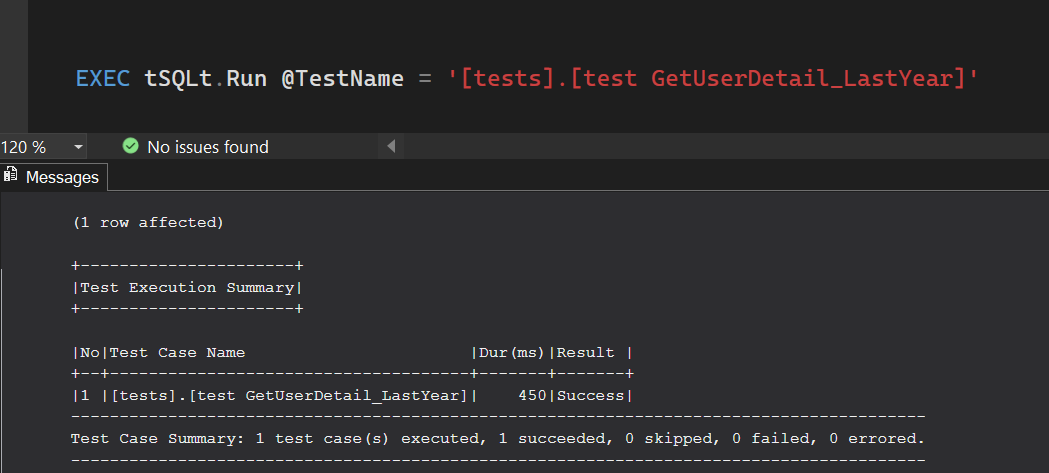
Spy Procedure has additional features, which include the ability to capture the parameter values passed into the intended procedure at the time. However, for our use case today, simply ignoring any calls to dbo.AddToAuditLog achieves what is needed. We are now confident that our unit test and stored procedure have been sufficiently isolated and have zero dependencies to external objects.
Recap
In today’s post, we have:
- Added an additional call to an external ‘audit log’ procedure, within our main dbo.GetUserDetail_LastYear procedure
- Verified that audit log information is being recorded when the procedure is called
- Introduced a fake bug, into the audit procedure that is called within our main procedure
- Witnessed the failure of our unit test, despite zero changes being made to dbo.GetUserDetail_LastYear and ’test GetUserDetail_LastYear’
- Utilised Spy Procedure to handle this external dependency on the Audit Log procedure to isolate our test / main procedure, to enable our test to pass again
In the next post, we will continue with our tSQLt journey and look at some of the additional tooling available to help us streamline our test case scenarios
Thanks for reading!
If you’ve found this post helpful or would just like to support the work I do here, consider buying me a coffee.