
SQL Unit Testing Using tSQLt: Part 3
The Journey Continues!
Welcome back to the tSQLt series, where we are covering the fundamentals of Unit Testing within SQL Server by using the tSQLt Framework.
Today we’re progressing onward by discussing some of the useful features within tSQLt to ensure our tests are accurate, reliable, and repeatable.
In the last post, we went through the process of creating a basic tSQLt test. We covered the basic constructs of generating a unit test by implementing the three stages of a test:
- Assemble
- Act
- Assert
Within the Assemble stage, we made use of the Fake Table function, which allowed us to create a ‘faked’ version of a table. Such functionality is a core pillar of unit testing with tSQLt. Our unit tests should be isolated and idempotent mechanisms.
The Fake Table function is just one of the many tools in our arsenal when using tSQLt, and I wanted to take some time in this post to cover another feature which will be useful to us - the Fake Function function. More official documentation about it here - Fake Function
From tSQLt.org:
Code that calls a function can be difficult to test if that function performs significant logic. We want to isolate the code we are testing from the logic buried in the functions that it calls. To create independent tests, we can replace a called function with a fake function. The fake function will perform much simpler logic that supports the purpose of our test. Often, the fake function will simply return a hard-coded value.
In this post, we are going to walk through a demo to illustrate the following:
- The underlying procedure being tested
- The Unit Test, which will test the underlying procedure
- The implementation of the Fake Function feature
Setting the Scene - The procedure to be tested
We have an updated procedure, from our last post, called - GetUserDetail_LastYear
The key things this procedure does:
- Takes in one input parameter called @DisplayName
- Retrieves information about the passed-in user, for the past year, based on the time the procedure is run (take note of this, trusted reader)
Once again, we’re going to be using the Stack Overflow database. Here is the full procedure:
CREATE OR ALTER PROCEDURE [dbo].[GetUserDetail_LastYear]
	@DisplayName NVARCHAR(100)
AS
BEGIN

    DECLARE @Now            DATETIME
    DECLARE @OneYearAgo     DATETIME

    SET @Now                = dbo.DateTimeNow()
    SET @OneYearAgo         = DATEADD(YEAR, -1, @Now)

    SELECT
        u.DisplayName,
        u.Location,
        u.Reputation,
        COUNT(c.Id) AS CommentCount
    FROM dbo.Users u
    INNER JOIN dbo.Comments c ON u.Id = c.UserId
    WHERE
        u.DisplayName = @DisplayName AND
		c.CreationDate BETWEEN @OneYearAgo AND @Now
    GROUP BY u.DisplayName, u.Location, u.Reputation
END
Calling the procedure for a particular user renders the following detail:
EXEC dbo.GetUserDetail_LastYear @DisplayName = 'Jon Skeet'

Setting the Scene - The Unit Test
Following the same methodology used in the last post, we have created a unit test for dbo.GetUserDetail_LastYear.
Here is the full unit test, we will discuss it in more detail later:
CREATE OR ALTER PROCEDURE [tests].[test GetUserDetail_LastYear]
AS
BEGIN

DECLARE
	@UserName NVARCHAR(100)	= 'Jon Skeet'


/* ASSEMBLE STAGE */

EXEC tSQLt.FakeTable 'dbo.Users'

INSERT INTO dbo.Users
(Id,DisplayName, Location, Reputation)
VALUES
	(22656,	'Jon Skeet'		,'Reading, United Kingdom'		,1047863),
	(22661,	'Virne'			,'Finland'						,1076),
	(22668,	'Dickon Reed'	,'Cambridge, United Kingdom'	,2237)


EXEC tSQLt.FakeTable 'dbo.Comments'

INSERT INTO dbo.Comments
(Id, UserId,CreationDate)
VALUES
	(436275	, 22661 , '2020-05-01 09:39:00.000'),
	(197827	, 22668 , '2024-09-26 16:35:51.177'),
	(37360	, 22656	, '2024-09-26 16:35:51.177'),
	(37585	, 22656	, '2025-01-26 16:35:17.310'),
	(36000	, 22656	, '2022-08-26 19:21:42.357')


CREATE TABLE dbo.Expected
(DisplayName NVARCHAR(100), Location NVARCHAR(200),Reputation INT, CommentCount INT)


CREATE TABLE dbo.Actual
(DisplayName NVARCHAR(100), Location NVARCHAR(200),Reputation INT, CommentCount INT)


INSERT INTO dbo.Expected
(DisplayName,Location, Reputation, CommentCount)
VALUES
	('Jon Skeet',	'Reading, United Kingdom',	1047863,	2)


/* ACT STAGE */

INSERT INTO dbo.Actual

EXEC [dbo].[GetUserDetail_LastYear]
	@DisplayName	= 'Jon Skeet'


/* ASSERT STAGE */

EXEC tSQLt.AssertEqualsTable
	@Expected	= 'dbo.Expected',
	@Actual		= 'dbo.Actual',
	@FailMsg	= 'Our test failed!'

END
So we now have our underlying stored procedure, we also have our associated unit test. If we call our test:
EXEC tSQLt.Run @TestName = '[tests].[test GetUserDetail_LastYear]'
The test passes, as expected:
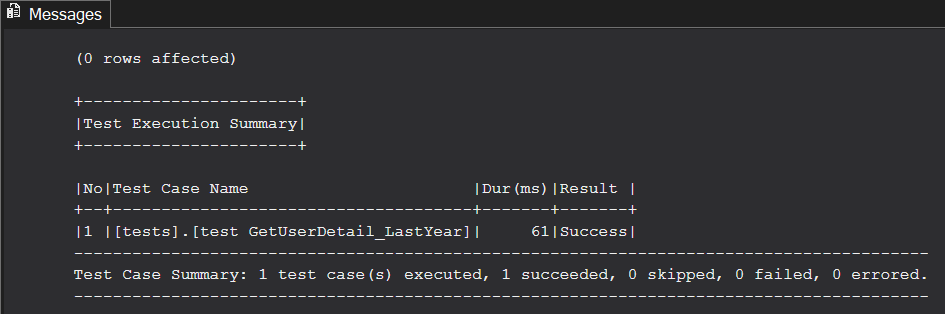
All is well, the test passes and our work here is done. Right?
WRONG.

Issue 1: The Date Function Used
Currently, if we run our new unit test, it runs without issue, for ‘today’. The eagle-eyed readers may have noticed something within our main stored procedure.
Within our stored procedure, we have the following function being used:
SET @Now = dbo.DateTimeNow()
This function is calculating the date and time when the procedure is executed.
We have written our unit test to calculate the results to accommodate this, for ’today’.
But what happens if we run it tomorrow? Next week? You guessed it, our test will fail because the date will obviously be different, and so will our date range that’s being used as a filter.
We are currently expecting a comment count of 2 to come back, based on the date the test is executed (today). This will obviously change over time and so, cannot be sure that our unit test will continue to pass.
Thankfully, the good folks over at tSQLt have thought of this and have a useful function for us to handle these scenarios. That function is the Fake Function.
Solution 1: The Fake Function
The Fake Function option allows us to tell tSQLt that whenever it encounters a particular function, it should ignore it and use something else. The ‘something else’ is where we can step in and become empowered to handle this scenario.
We will add the following to our unit test code, within the “Assemble” section:
EXEC tSQLt.FakeFunction @FunctionName = 'dbo.DateTimeNow', @FakeFunctionName = 'Fake.DateTimeNow'
As above, we are calling the Fake Function option to say whenever we encounter the function dbo.DateTimeNow, that we should actually use the function ‘Fake.DateTimeNow’ instead.
This allows us to use a ‘faked’ version of the function. Here is our faked version:
CREATE OR ALTER FUNCTION [Fake].[DateTimeNow]()
	RETURNS DATETIME
AS
BEGIN
	RETURN '2025-04-11 00:00:00.000'
END
GO
This version simply returns a static datetime which is perfect for us to be able to generate a repeatable method for interrogating the data when running our unit test.
This is ideal, as our focus isn’t on testing the underlying functionality of the dbo.DateTimeNow function at this stage. We are only concerned with the isolated test of the stored procedure dbo.GetUserDetail_LastYear. We can now be confident that whenever our unit test is executed, it’s always going to use the same date to interrogate the data.
Should we need to, we can create a dedicated unit test for the actual function at a later date, in isolation.
Our updated unit test, now begins like this:
CREATE OR ALTER PROCEDURE [tests].[test GetUserDetail_LastYear]
AS
BEGIN

DECLARE
	@UserName NVARCHAR(100)	= 'Jon Skeet'


/* ASSEMBLE STAGE */

EXEC tSQLt.FakeFunction @FunctionName = 'dbo.DateTimeNow', @FakeFunctionName = 'Fake.DateTimeNow'


EXEC tSQLt.FakeTable 'dbo.Users'

INSERT INTO dbo.Users
(Id,DisplayName, Location, Reputation)
VALUES
	(22656,	'Jon Skeet'	,'Reading, United Kingdom'	,1047863),
	(22661,	'Virne'		,'Finland'			,1076),
	(22668,	'Dickon Reed'	,'Cambridge, United Kingdom'	,2237)

...

/* TRUNCATED FOR BREVITY */
I hope you enjoyed this post that covered the Fake Function option of tSQLt. Once again, this is just one of many useful tools we can access when using the tSQLt framework. There are many more which we will continue to cover in the next post in the series. Speaking of which, next up, we will cover ‘Spy Procedure’ feature of tSQLt. I hope to see you there.
Thanks for reading.
If you’ve found this post helpful or would just like to support the work I do here, consider buying me a coffee.