
Learning SQL Server 2025: DOP Feedback
Introduction
SQL Server 2025 is out at last and we are continuing our journey into some of the new features this version brings.
The latest version of SQL Server continues to evolve some of the features we first saw in SQL 2022 and one of those features is ‘DOP Feedback’ (Degree of Parallelism Feedback).
This database-level feature was first introduced in SQL 2022, but was off by default and had to be explicitly enabled.
Boldly, SQL 2025 has this turned on by default, which I think shows the confidence Microsoft now has in this feature.
To check the status of this feature in your environment, run the following:
SELECT name, value, is_value_default FROM sys.database_scoped_configurations
WHERE name = 'DOP_FEEDBACK'
GO
So, although not a new feature in SQL 2025, it is now enabled by default in SQL 2025, so I thought we should take a look at what it actually is and how it can help us.
What does it do?
In my experience, parallelism waits are quite a common occurrence across OLTP instances. This could be due to a number of factors. Getting the correct configuration for MAXDOP can be tricky on busy workloads. There are so many factors to contend with and differing sizes of queries going through the instance.
The DOP Feedback feature attempts to eliminate parallelism inefficiencies for common queries by dynamically adjusting the Degree of Parallelism (DOP) at the query level.
But what does “eliminate parallelism inefficiencies” actually mean, I hear you ask?
A simple example of this would be a query running at DOP 12 each time it is executed. However, lowering the DOP of this query to say, 4, might actually improve its performance. Yes - believe it or not folks, running across as many cores as possible is not always best for your query performance (TWL - today we learned).
This feature will identify suitable queries, assess any potential improvements that could be gained by adjusting the DOP, and take action where applicable.
This is achieved by utilising the following feedback loop:
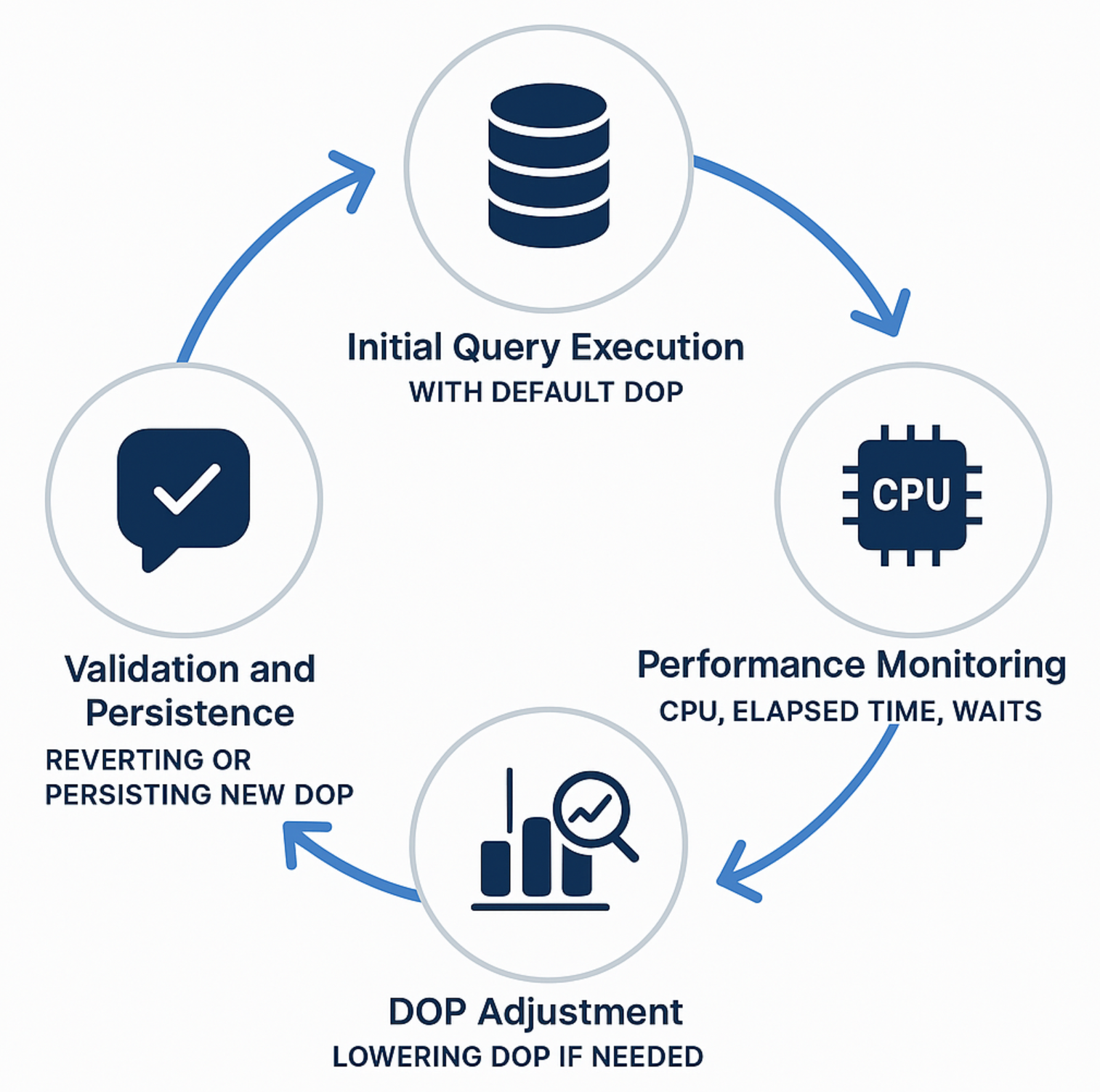
Image credit: Microsoft
Feature Pre-requisites
There are a number of prerequisites you need to be aware of in order to use this feature:
- SQL 2022 or higher is required (but as discussed, it is now on by default in SQL 2025)
- DOP Feedback is available for queries that operate at database compatibility level 160
- Query Store needs to be enabled on the database and it needs to be in READ/WRITE mode
Seeing it in action
In order to demo this feature, there are a number of factors I need to make you aware of regarding my setup. Getting it working as I wanted took a bit of noodling™️.
- My host has been limited 8 CPUs
- My host has 32Gb RAM with 24Gb accessible by the SQL instance
- My host has fast storage utilising an NVMe solid-state drive
- MAXDOP on the instance has been set to 0
- Query Store has been enabled and is in READ/WRITE operation mode
- An Extended Event Session is running to capture the DOP Feedback events that occur
- The StackOverflow table Posts has been modified in terms of record count
The query I will use to show the feature is a simple procedure running within the StackOverflow2013 database:
CREATE PROCEDURE [dbo].[Percy] @CommentCount int
AS
BEGIN
SELECT
    [Id],
    CommentCount,
    Body,
    LastEditorUserId,
    PostTypeId
FROM dbo.Posts p
WHERE CommentCount = @CommentCount
ORDER BY Body;
END;
GO
I will run this stored procedure multiple times using OSTRESS. This is the command being executed:
"c:\Program Files\Microsoft Corporation\RMLUtils\ostress" -S"Cecil\SQL2022" -E -Q"EXEC dbo.Percy @CommentCount = 4;" -n3 -r75 -q -dStackOverflow2013 -T146
Noteworthy settings used for OSTRESS:
- n = the number of concurrent connections being used is 3
- r = each connection will run the procedure 75 times
- T = trace flag 146 is used to ensure the connection does not attempt to encrypt data transmitted between the client and SQL Server
The Results
In order to see what is happening during execution, we are going to view the live data from our Extended Event session.
This is the output from that session, with the session sorted by timestamp (ascending):
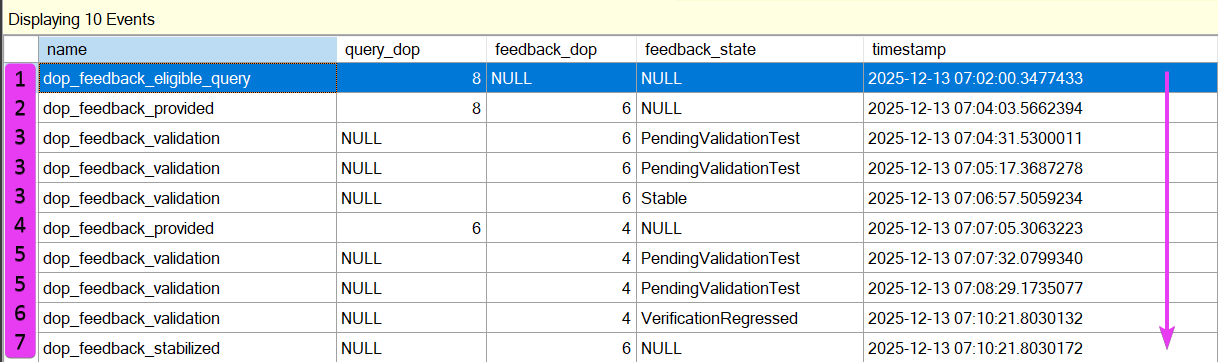
Now, I am going to say DOP a lot in the next paragraph or two, do forgive me, but it is easier than saying ‘degree of parallelism’ each time. The timeline of events is interesting, and shows the DOP Feedback feature in action.
The stages are:
1 = Query is chosen as an eligible query for DOP Feedback and is currently DOP 8
2 = DOP Feedback is provided and 6 is chosen as a candidate to try
3 = DOP 6 is validated twice and is finally deemed stable
4 = DOP Feedback is provided again, this time it is 4
5 = DOP 4 is once again validated several times
6 = However, the query regressed at a DOP of 4
7 = DOP Feedback stabilises at 6 and the process stops there
I think this is pretty cool. SQL is looking for queries that are eligible and proactively initiating that feedback loop we discussed earlier in the post. The query became faster with each DOP change, until it reached DOP 4 which caused some regression.
At a high level, the timeline of events:
1. Eligible query chosen
2. New DOP chosen
3. New DOP verified several times - did it perform better or worse?
4. New DOP outcome - stable or regressed
5. If stable - attempt a new DOP. If regressed - remain at the current DOP
Looking in Query Store we can see, even in this short demo, the execution times improved by adjusting the DOP dynamically:
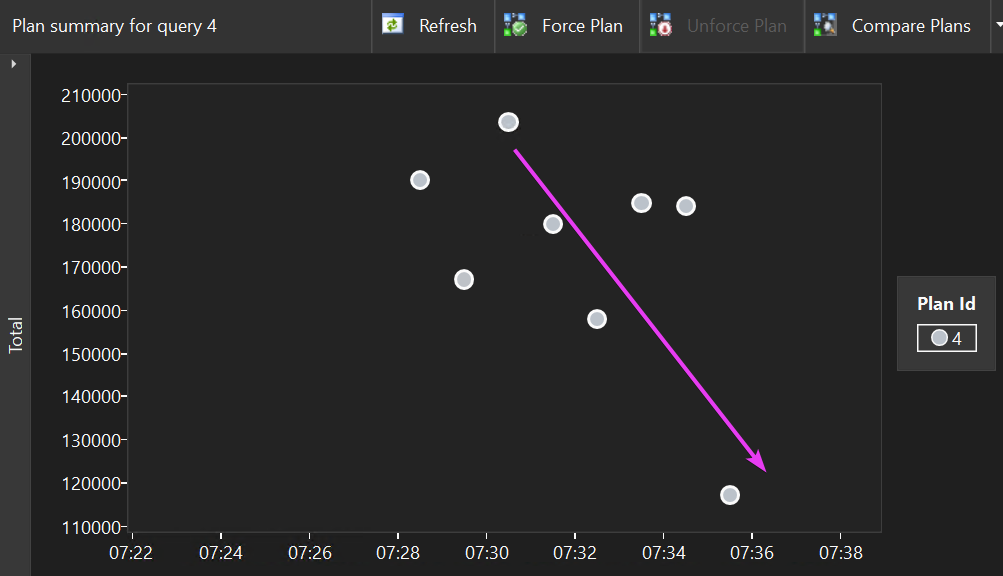
I just love how SQL is choosing a new DOP and validating it several times before taking action on it. This feedback loop feels pretty robust to me, and I can see why Microsoft has decided to enable it by default in SQL Server 2025. I am hopeful this is going to work well (crosses fingers, turns around and touches the ground).
Wrapping Up
Setting the correct MAXDOP across busy OLTP environments has frequently been a challenge in my experience. Many of the environments I see out in the field are so varied in terms of the queries running on them. Each part of the business will have different needs and requirements when accessing that data, and this shows in the types of queries that can run on a single instance. For example, huge reporting queries may benefit from having all the cores at their disposal, whereas other small ad hoc queries could make do with a fraction of the resources available.
Will this feature work as well as I hope it does in production? So far, I am hopeful. Seeing this feature in action on a busy production workload is going to be fascinating and I hope people give it a go and provide feedback on it, if you will pardon the pun.
This feature, along with others, makes me excited to start working with SQL Server 2025.
Thanks for reading!
If you’ve found this post helpful or would just like to support the work I do here, consider buying me a coffee.